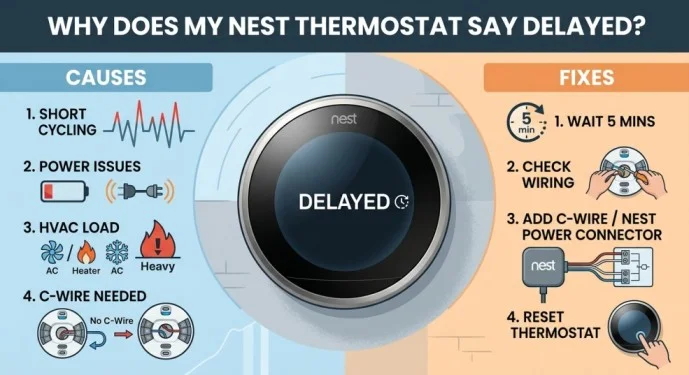
If your Nest thermostat says “Delayed” or displays a message such as “Heating is delayed,” it usually means your heating or cooling system is waiting before turning on. In many cases, this is normal and helps protect your HVAC equipment.
However, if the delay happens frequently or lasts unusually long, it may indicate a power, wiring, or HVAC problem. Understanding the possible causes can help you determine whether the delay is normal or needs attention.
What Does “Delayed” Mean on a Nest Thermostat?
A Nest thermostat delay is generally a short waiting period before your heating or cooling system starts.
For example, you may lower the temperature to turn on the air conditioner. Instead of starting immediately, the thermostat may display “Delayed” for a few minutes.
This delay can prevent the HVAC system from starting and stopping too quickly. Rapid cycling can place unnecessary stress on certain components, especially the compressor.
Therefore, seeing “Delayed” briefly does not necessarily mean your Nest thermostat is broken.
Why Does My Nest Thermostat Say Delayed?
There are several reasons why your Nest thermostat may show a delay.
1. Compressor Protection
One of the most common reasons is a built-in safety delay. Air conditioners and heat pumps may need a short period before restarting.
The delay helps protect the compressor from rapid cycling. If the message disappears after a few minutes and the system starts normally, there may be no problem.
2. Low Thermostat Power
Low power can also cause the Nest thermostat to display a delay.
Your Nest thermostat gets power from your HVAC system and uses that power to keep its internal battery charged. If the thermostat does not receive enough consistent power, you may notice delayed heating or cooling.
Other signs can include a low-battery warning, disconnections, or unexpected thermostat behavior.
3. C-Wire or Wiring Problems
Incorrect, loose, or insufficient wiring can prevent the thermostat from receiving consistent power.
A C wire, also known as a common wire, can provide continuous power to compatible thermostat systems. Some installations may require a C wire or another compatible power solution.
If you suspect a wiring problem, turn off power to the HVAC system before checking anything. If you are unsure about the wiring, contact a qualified professional.
4. Power Outage
A recent power outage can temporarily affect your Nest thermostat.
When the HVAC system loses power, the thermostat may rely on its internal battery. After power returns, the thermostat may need some time to recharge and reconnect with the system.
If the delay appeared after an outage, give the system some time and check whether normal operation returns.
5. HVAC System Problems
Sometimes the thermostat is not the source of the problem.
A malfunctioning furnace, air conditioner, wiring connection, clogged filter, or another HVAC component can prevent the system from operating correctly.
If your Nest thermostat continues showing “Delayed” and the heating or cooling system does not start, the HVAC system itself may need inspection.
How to Fix a Nest Thermostat Delay
Try these basic troubleshooting steps if your Nest thermostat keeps saying “Delayed.”
Step 1: Wait a Few Minutes
Start by waiting for the countdown to finish.
If the heating or cooling system starts normally afterward, the delay was likely part of the system’s normal operation.
Step 2: Check the Battery
Check your Nest thermostat for a low-battery warning.
If the battery is low, allow the thermostat to recharge. Depending on the Nest model, charging methods and battery behavior can vary.
Read Also : Netflix Ad Blocker: Chrome Extensions & How to Use Them
Step 3: Check HVAC Power
Make sure your heating or cooling system has power.
Check the relevant HVAC switch and circuit breaker. If the system recently experienced a power outage, restoring power may resolve the problem.
Step 4: Look for Error Messages
Check your Nest thermostat and Google Home app for additional warnings or error codes.
A specific error message may provide useful information about power, wiring, or HVAC problems.
Step 5: Check the Wiring
If the delay continues, the thermostat wiring may need to be inspected.
Never work on thermostat wiring while the HVAC system is powered. If you are not comfortable checking electrical connections, it is safer to have a qualified technician inspect the installation.
When Is a Nest Thermostat Delay a Problem?
A short delay is usually normal.
You should investigate the issue if the Nest thermostat stays on “Delayed” for a long time, repeatedly delays during normal operation, or fails to turn on your heating or cooling system.
Other warning signs include low-battery messages, frequent disconnections, unexpected system cycling, or error codes.
When several of these symptoms occur together, the problem may involve the thermostat’s power supply, wiring, or HVAC equipment rather than the delay itself.
Read Also : Nest Thermostat Delayed: Why It Says “Delayed” & How to Fix It
Final Thoughts
A Nest thermostat saying “Delayed” does not automatically mean that something is broken. A brief delay can be a normal safety feature designed to protect your HVAC system.
If the message keeps appearing, lasts unusually long, or occurs with low-power warnings and heating or cooling problems, check the thermostat’s battery, power supply, wiring, and HVAC system.
If basic troubleshooting does not solve the issue, professional HVAC service may be necessary to identify the underlying problem.
Frequently Asked Questions
Why does my Nest thermostat say delayed?
Your Nest thermostat may say “Delayed” because the HVAC system is waiting before starting. It can also happen because of low power, wiring problems, a recent power interruption, or an HVAC issue.
How long should a Nest thermostat delay last?
A short delay of a few minutes can be normal. If the delay continues for an unusually long time or happens repeatedly, you should investigate the cause.
How do I get my Nest thermostat out of delayed mode?
Usually, you do not need to manually remove the message. Wait for the countdown to finish. If it keeps returning, check the thermostat’s power, battery, HVAC power, wiring, and error messages.
Can a low battery cause Nest thermostat delay?
Yes. Insufficient power can affect thermostat operation and may result in delayed heating or cooling. Check the thermostat for a low-battery warning.
Can a C wire fix Nest thermostat delay?
A C wire can provide consistent power to compatible thermostat systems and may help with power-related problems. However, it is not a universal solution because wiring requirements depend on your HVAC system and Nest model.
Should I reset my Nest thermostat?
Resetting the thermostat is not usually the first solution for a temporary delay. Check the battery, power supply, HVAC system, and error messages first. If the issue continues, follow the troubleshooting instructions for your specific Nest model or contact a professional.