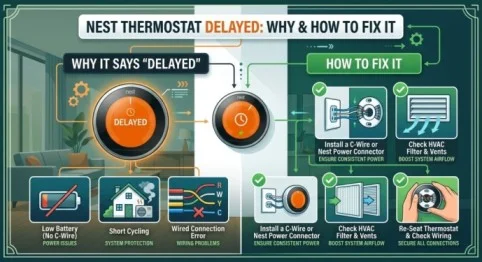
Seeing “Delayed” on your Nest thermostat can be confusing, especially when you expect your heating or air conditioning system to start immediately. In many cases, the message is not a serious problem. Nest may display a delay when it needs to protect your HVAC equipment or when there is not enough power available to operate the system normally.
If your Nest says delayed, understanding the reason can help you determine whether you need to wait, check your wiring, or troubleshoot the thermostat.
What Does “Delayed” Mean on a Nest Thermostat?
When your Nest thermostat displays “Delayed,” it usually means the thermostat is waiting before turning your heating or cooling system on.
This delay can help prevent your HVAC equipment from switching on and off too quickly. Frequent cycling can place unnecessary stress on components such as the compressor.
A short delay is often normal. However, if your thermostat remains delayed for an extended period or repeatedly shows the message, there may be an underlying issue that needs attention.
Why Is My Nest Thermostat Delayed?
There are several possible reasons for a delayed message.
1. The Thermostat Is Protecting Your HVAC System
One of the most common explanations is built-in equipment protection. If your air conditioner or heat pump has recently turned off, Nest may wait several minutes before starting it again.
This prevents rapid cycling and gives the system time to stabilize.
2. Low Battery or Insufficient Power
A Nest thermostat requires adequate power to operate. If its internal battery is low, you may see delayed behavior or other unusual symptoms.
A low battery can sometimes occur because the thermostat is not receiving enough power through the HVAC wiring. This can be more common with systems that do not provide a dedicated common wire, also known as a C-wire.
3. Wiring Problems
Incorrect, loose, or damaged thermostat wiring can interfere with normal operation. If the thermostat was recently installed, moved, or serviced, check whether the wires are properly connected.
Do not work on HVAC wiring while power is on. If you are unsure about the wiring, contacting a qualified HVAC professional is safer.
Read Also : IT Outsourcing Boston: Outsourced IT Support & Services
4. HVAC System Problems
Sometimes the thermostat is working correctly while the actual heating or cooling equipment has a problem. A faulty furnace, air conditioner, heat pump, fuse, breaker, or control board can prevent the system from responding.
If Nest repeatedly says delayed and the HVAC system does not start, the equipment itself may need inspection.
How to Fix a Nest Saying “Delayed”
If your Nest is saying delayed, try these basic troubleshooting steps.
Wait a Few Minutes
First, give the thermostat some time. A short delay is often intentional, particularly after the system has recently run.
Check the Temperature Setting
Make sure the target temperature is sufficiently different from the current room temperature. If the temperature is already close to your selected setting, the HVAC system may not need to run.
Check Power and Circuit Breakers
Check your HVAC system’s circuit breaker and make sure it has not tripped. If a breaker repeatedly trips, avoid repeatedly resetting it and have the system inspected.
Check the Nest Battery
If the thermostat reports a low battery, allow it to recharge or follow the manufacturer’s instructions for charging, depending on your Nest model.
Restart the Thermostat
A restart can resolve temporary software or communication problems. Use the thermostat’s settings to restart it rather than immediately performing a factory reset.
When Should You Call a Professional?
If Delayed on Nest remains for a long time, appears frequently, or your heating and cooling system does not operate, professional assistance may be appropriate.
An HVAC technician can inspect the thermostat wiring, power supply, control board, and HVAC equipment. If the issue appeared after installation, a qualified Nest installer can also verify that the thermostat is compatible and wired correctly.
Read Also : Microsoft Modern Workplace: Solutions & Services Guide
Final Thoughts
A Nest thermostat delayed message is often a normal protection feature rather than a serious fault. Waiting several minutes may be all that is necessary. However, repeated delays can indicate low power, wiring problems, or an HVAC issue.
Start with simple checks such as waiting, reviewing the temperature setting, checking the breaker, and restarting the thermostat. If the problem continues, professional diagnosis can help prevent damage to your HVAC system.
Frequently Asked Questions
1. Why does my Nest say “Delayed”?
Nest may say “Delayed” when it is waiting before activating your HVAC system. This can protect the equipment from rapid cycling or occur when the thermostat has insufficient power.
2. How long should Nest stay on “Delayed”?
A short delay of several minutes can be normal. If the message continues for an unusually long time or repeatedly prevents heating or cooling, further troubleshooting may be necessary.
3. Can a low battery cause Nest to say delayed?
Yes. Insufficient power can affect Nest’s operation and may contribute to delayed behavior. Checking the thermostat’s battery or power status can help identify the problem.
4. Does a C-wire fix Nest delayed problems?
A properly installed C-wire can provide continuous power to compatible Nest thermostats and may resolve power-related issues. However, it will not fix every possible cause of a delayed message.
5. Should I reset my Nest thermostat if it says delayed?
A restart may help with a temporary issue, but a factory reset is usually not the first troubleshooting step. Check power, settings, and HVAC operation first.