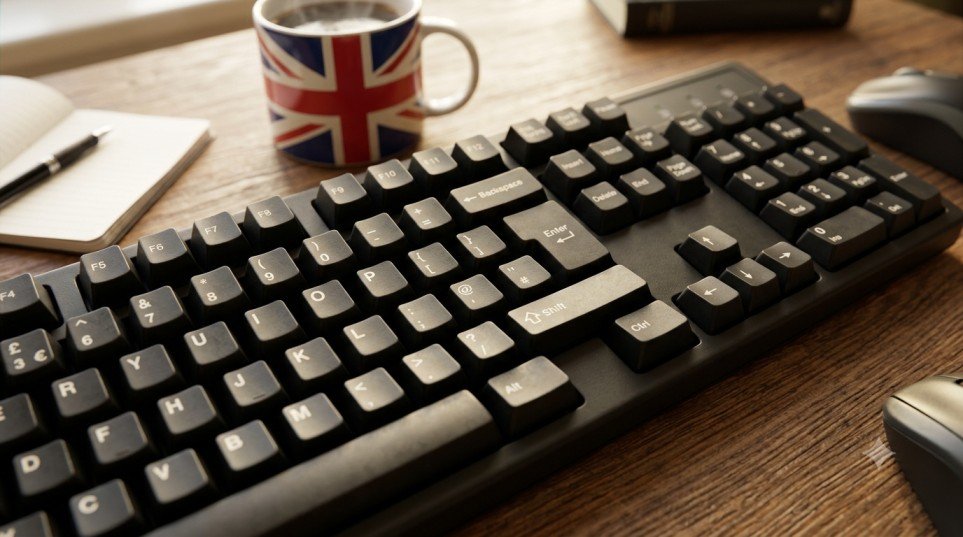
A British keyboard, often called a UK keyboard, is designed for users in the United Kingdom and has several differences from the standard US keyboard. While the overall QWERTY layout looks familiar, certain keys, symbols, punctuation marks, and shortcuts are arranged differently.
Understanding the British keyboard layout can make typing faster and help you find commonly used symbols such as the £ pound sign without searching for them. Whether you have recently switched to a UK keyboard or are using a British computer for the first time, this guide explains the layout, important shortcuts, and useful key combinations.
What Is a British Keyboard?
A British keyboard is a physical keyboard layout commonly used in the United Kingdom. It follows the QWERTY arrangement but changes the position of some symbols compared with the US keyboard.
One of the most noticeable differences is the presence of a dedicated £ key. The British layout also places certain punctuation symbols in different locations. For example, the quotation mark and @ symbols are positioned differently from their locations on many US keyboards.
These differences may seem small, but they can be important when typing passwords, emails, documents, code, or financial information.
British Keyboard Layout
The British keyboard generally contains the same main letter keys as other QWERTY keyboards. The differences become more obvious when you look at the number row and punctuation keys.
On a typical UK keyboard:
- The £ symbol is available using the number 3 key.
- The @ symbol is usually found on the apostrophe key.
- The ” symbol is commonly accessed using Shift and the apostrophe key.
- The Enter key is typically larger and has a distinctive shape.
- Some punctuation marks are positioned differently from the US layout.
- A backslash key is normally located near the Enter key.
The exact appearance can vary depending on the keyboard manufacturer, but the basic UK layout remains consistent.
How to Type the £ Sign on a British Keyboard
One of the biggest advantages of a British keyboard is that the pound sign is easy to access.
To type £, press:
Shift + 3
This produces the British pound symbol when your computer is configured to use the UK keyboard layout.
You may also encounter the $ symbol on the same key. Pressing the number 3 by itself normally produces 3, while holding Shift produces £.
If Shift + 3 does not produce £, your computer may be using a different keyboard layout. Checking your operating system’s language and keyboard settings can usually resolve the issue.
Common British Keyboard Shortcuts
Keyboard shortcuts can save time when working with documents, browsers, and other applications. Most common Windows shortcuts work normally on a British keyboard.
Some useful shortcuts include:
- Ctrl + C — Copy selected content
- Ctrl + V — Paste content
- Ctrl + X — Cut selected content
- Ctrl + Z — Undo an action
- Ctrl + Y — Redo an action
- Ctrl + A — Select everything
- Ctrl + S — Save a file
- Ctrl + F — Find text
- Alt + Tab — Switch between open applications
- Windows + D — Show or hide the desktop
The location of letters does not change between UK and US QWERTY layouts, so these shortcuts are generally easy to use after switching between them.
British vs. US Keyboard
The British and US keyboard layouts are similar but not identical.
The most obvious difference is the £ symbol, which is directly accessible on a UK keyboard. The placement of @, “, #, and several other symbols also differs.
The Enter key and some punctuation keys may have different shapes or positions as well. These differences can cause confusion if your computer’s software layout does not match the physical keyboard.
For example, someone using a physical British keyboard while their operating system is configured for a US keyboard may press one key and receive a different symbol than expected.
How to Switch to a British Keyboard Layout
If your physical keyboard is British but your computer is using another layout, you can change the keyboard language settings.
On Windows, you can add English (United Kingdom) as a preferred language and select the UK keyboard layout. After switching, the symbols produced by your keys should match the markings printed on the physical keyboard.
On many Windows computers, Windows + Space can also be used to switch between installed keyboard layouts.
On macOS, keyboard layouts can be managed through the system’s keyboard and input settings.
Read Also : Brainsclub: What It Is, Risks & Cybersecurity Guide
Why Does the British Keyboard Matter?
Knowing the British keyboard layout is useful for students, office workers, programmers, writers, and anyone who regularly works with UK-based systems.
It is especially helpful when typing:
- British currency amounts
- Business documents
- Addresses and forms
- Email messages
- Passwords and usernames
- Programming symbols
- UK-specific punctuation
Once you become familiar with the key differences, switching between British and American keyboards becomes much easier.
Conclusion
The British keyboard is very similar to other QWERTY layouts, but its different symbol placement makes it important to understand the UK-specific arrangement. The convenient £ sign, different locations for @ and quotation marks, and familiar keyboard shortcuts are some of its defining features.
Once your physical keyboard and computer’s software layout are correctly matched, typing on a British keyboard is straightforward. Learning a few key combinations, particularly Shift + 3 for £, can make everyday typing much quicker and easier.
Read Also : Asianfeels: Login, Features & Honest Review
FAQs About British Keyboards
What is the £ key on a British keyboard?
On a standard British keyboard, the £ symbol is usually typed with Shift + 3.
Is a British keyboard the same as a US keyboard?
No. Both generally use QWERTY, but the position of several symbols and punctuation marks differs. The British layout also provides easy access to the £ symbol.
How do I type £ without a British keyboard?
If you are using Windows, you can often type £ using Alt + 0163 on a numeric keypad. You can also copy and paste the symbol or use your operating system’s character input tools.
Why does Shift + 3 type something other than £?
Your operating system may be configured for a different keyboard layout. Check your language and keyboard settings and select the UK layout if appropriate.
Where is @ on a British keyboard?
On a standard UK keyboard, the @ symbol is generally typed using Shift + the apostrophe key, located near the Enter key.
Can I use a British keyboard in another country?
Yes. A British keyboard can be used anywhere. However, you may want to change the computer’s software keyboard layout depending on the language and symbols you need.