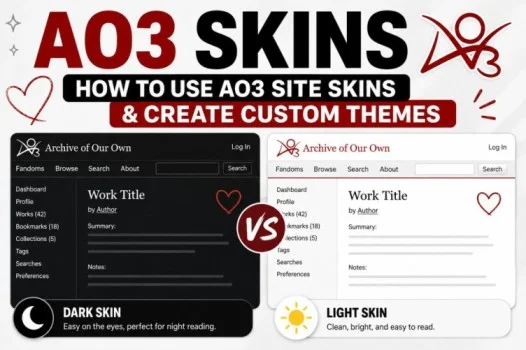
If you use Archive of Our Own (AO3), you may have noticed that some users customize the appearance of their pages with different colors, fonts, layouts, and backgrounds. These customizations are known as AO3 skins.
AO3 provides site skins that can change how the website looks for you. Users can also create or customize skins using CSS to personalize their reading experience.
This guide explains AO3 skins, how AO3 site skins work, what work skins are, and how you can create a custom theme.
Read also; 959 Area Code: Location, Cities & What Area Code 959 Means
What Are AO3 Skins?
AO3 skins are custom styles that change the visual appearance or formatting of pages on Archive of Our Own.
A skin can modify things such as:
- Colors
- Fonts
- Text sizes
- Backgrounds
- Borders
- Spacing
- Page layouts
- Certain visual elements
AO3 skins are generally created using CSS, which controls how webpages are displayed.
There are two important types to understand: site skins and work skins.
What Are AO3 Site Skins?
AO3 site skins change the appearance of AO3 for the person using the skin. They can make the website more comfortable to read or give it a completely different visual style.
For example, you could create a dark theme with a dark background and light text, increase the font size, or change the colors used throughout the site.
Site skins are useful if you want AO3 to look different while browsing and reading works.
What Is a Work Skin on AO3?
So, what is a work skin AO3 users may see attached to a fanwork?
A work skin is a style that can be applied to an individual work. Unlike a personal site skin, a work skin can affect how a particular work is displayed to readers.
Authors may use work skins for specialized formatting, such as:
- Poetry
- Text-message conversations
- Chat-style fiction
- Custom layouts
- Special typography
- Decorative formatting
- Visual effects
Because work skins can affect how a work appears to readers, they should be used carefully. A complicated design may not display well on every device or for every reader.
AO3 Site Skins vs. Work Skins
Although both use CSS-based styling, they have different purposes.
| Feature | Site Skin | Work Skin |
| Main purpose | Customize AO3’s interface | Customize an individual work |
| Usually created by | The reader/user | The work’s author |
| Applies to | Your AO3 browsing experience | A specific work |
| Can change colors and fonts | Yes | Yes, within its intended scope |
| Designed for general site use | Yes | No |
| Designed for individual works | No | Yes |
Understanding this distinction makes it easier to choose the right type of skin.
How to Use an AO3 Site Skin
If you want to change the appearance of AO3, you can create or select a site skin through your account settings.
A typical process is:
- Sign in to your AO3 account.
- Open your account or dashboard settings.
- Find the Site Skin section.
- Browse available skins or create a new one.
- Select or edit the skin.
- Save your changes.
- Return to AO3 and check the updated appearance.
The exact interface can change as AO3 develops, so the labels or locations of settings may vary.
How to Create a Custom AO3 Skin
Creating a custom AO3 skin is useful if you want a design that isn’t available among the standard options.
You generally create a site skin and add CSS rules that modify the appearance of AO3.
For example, a simple CSS rule could change the background and text colors:
body {
background: #f5f1e8;
color: #333;
}
This is only a basic example. More advanced CSS can modify many parts of the interface.
If you’re unfamiliar with CSS, start with small changes rather than attempting to redesign the entire website at once.
What Can You Change With AO3 Skins?
Depending on the CSS you use, an AO3 skin can change many visual aspects of the interface.
Colors
You can customize backgrounds, text, links, borders, and other interface elements.
Fonts
You may change font families, sizes, weights, and other typography properties.
Spacing
CSS can be used to adjust margins, padding, and the amount of space between elements.
Backgrounds
Some users create decorative or themed backgrounds. However, a background should remain subtle enough that it doesn’t interfere with reading.
Dark Themes
One of the most common reasons people create custom AO3 skins is to make the site easier to read in low-light environments.
A dark theme can use a dark background with appropriately contrasting text and links.
AO3 Skin That’s Very Swirly and Gold
One of the more creative possibilities is an AO3 skin that’s very swirly and gold.
A gold-themed skin could combine warm gold tones with decorative borders, subtle patterns, and elegant typography. A swirly design might use decorative elements around headings or page sections while keeping the main reading area simple.
When creating a highly decorative skin, remember that readability should come first. Gold text on a light background, for example, can have poor contrast.
A practical design might use:
- A dark or neutral background
- Gold accents
- High-contrast body text
- Decorative headings
- Subtle borders
- Minimal background patterns
This gives the theme a distinctive appearance without making fanfiction difficult to read.
Tips for Designing a Good AO3 Skin
A visually impressive skin isn’t necessarily a good skin. The best themes balance appearance and usability.
Prioritize Readability
Make sure body text is easy to read for long periods.
Use Good Contrast
Text should stand out clearly from the background. Avoid combinations that look attractive but are difficult to read.
Keep Links Visible
Links should be easy to distinguish from ordinary text.
Test Different Screen Sizes
A design that looks good on a desktop may behave differently on a phone or tablet.
Avoid Excessive Decoration
Large backgrounds, animations, and complicated layouts can distract from the actual content.
Make Changes Gradually
If you’re learning CSS, change one section at a time. This makes it easier to identify problems when something doesn’t look right.
Common Problems With AO3 Skins
Sometimes a custom skin doesn’t look the way you expected.
Possible causes include:
- Incorrect CSS syntax
- A selector targeting the wrong element
- Conflicting CSS rules
- Poor color contrast
- A design that doesn’t adapt well to smaller screens
- Changes to AO3’s interface affecting custom CSS
If something breaks, temporarily simplify the CSS and add your customizations back one at a time.
Are AO3 Skins Safe?
Site skins are primarily a way to customize the appearance of the website through CSS. However, users should be cautious when copying CSS from unknown sources.
Only use code that you understand or trust, particularly if you’re adding third-party customizations.
If a skin behaves unexpectedly, remove or disable it and return to a standard site skin.
Final Thoughts
AO3 skins give readers and authors a flexible way to customize the appearance and presentation of content on Archive of Our Own. Site skins can personalize the overall browsing experience, while work skins can provide specialized formatting for individual works.
Whether you prefer a simple dark theme, a clean minimalist design, or an elaborate swirly gold AO3 skin, CSS provides plenty of possibilities. The most successful custom themes combine personalization with readability, accessibility, and compatibility across different devices.
Frequently Asked Questions
What are AO3 skins?
AO3 skins are custom styles that modify the appearance or formatting of Archive of Our Own.
What are AO3 site skins?
AO3 site skins customize the appearance of the AO3 website for the user who activates them.
What is a work skin on AO3?
A work skin is a style associated with an individual work and can be used by an author to create specialized formatting or presentation.
Can I create my own AO3 skin?
Yes. Users can create custom site skins using CSS to modify aspects of the AO3 interface.
Can an AO3 skin change fonts and colors?
Yes. CSS can be used to change many visual properties, including fonts, colors, backgrounds, borders, and spacing.
Can I make an AO3 skin with a gold theme?
Yes. You can design a custom theme around gold colors and decorative elements. If you create a very swirly or elaborate design, make sure the text remains readable.
Do AO3 skins affect everyone?
A personal site skin generally affects the user’s own AO3 viewing experience. Work skins are associated with individual works and can affect how those works are displayed.